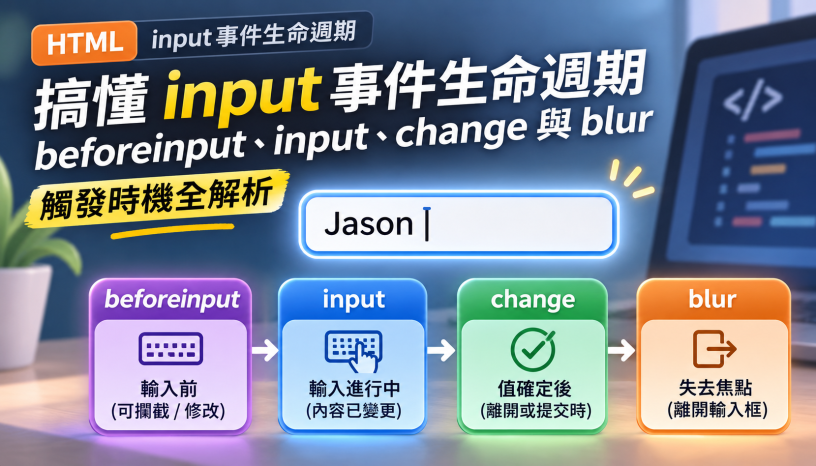


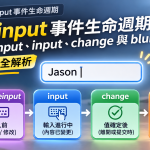
在日常專案開發中,表單互動幾乎無處不在。每當需要實作即時搜尋(Live Search)、字數統計、自動儲存或離開欄位格式校驗時,許多工程師常因不清楚 HTML input 事件(包含
beforeinput、input、change、blur與focusout)的確切觸發順序與冒泡(Bubbling)差異而踩坑;在中文語系網站中,更常遇到使用者打注音或倉頡選字尚未完成時,input事件就提前把半成品拼音送出查詢。這篇筆記將依據 W3C UI Events Specification 與 WHATWG HTML Standard §4.10.5.5,帶大家徹底釐清表單事件的底層生命週期與生產級實作寫法。
⚡ 快速簡單使用(30 秒複製即用範本)
以下提供支援**「中文注音 IME 組字防護(event.isComposing)」、「Debounce 防抖動」與「AbortController 取消過期請求防競態」**的生產級即時搜尋表單範本:
<div class="search-box">
  <label for="product-search">搜尋商品關鍵字</label>
  <input
    type="search"
    id="product-search"
    name="q"
    placeholder="請輸入商品名稱(支援中英文即時檢索)"
    autocomplete="off"
  >
  <p id="search-status" aria-live="polite"></p>
</div>

<script>
  const searchInput = document.getElementById('product-search');
  const statusEl = document.getElementById('search-status');
  let debounceTimer = null;
  let currentAbortController = null;
  let lastQueriedValue = '';

  function triggerDebouncedSearch(rawValue) {
    const keyword = rawValue.trim();
    clearTimeout(debounceTimer);

    debounceTimer = setTimeout(async () => {
      // 關鍵字與上一次查詢相同時不重複送出(例如 compositionend 與 input 先後帶來同一個值)
      if (keyword === lastQueriedValue) return;
      lastQueriedValue = keyword;

      // 取消前一次尚未完成的網路請求,避免舊回應覆蓋新結果(Race Condition)
      if (currentAbortController) {
        currentAbortController.abort();
      }

      if (!keyword) {
        statusEl.textContent = '';
        return;
      }

      currentAbortController = new AbortController();
      statusEl.textContent = `正在搜尋「${keyword}」...`;

      try {
        const res = await fetch(`/api/products?q=${encodeURIComponent(keyword)}`, {
          signal: currentAbortController.signal
        });
        const data = await res.json();
        statusEl.textContent = `找到 ${data.total} 筆與「${keyword}」相關的商品。`;
      } catch (err) {
        if (err.name !== 'AbortError') {
          statusEl.textContent = '搜尋發生異常,請稍後再試。';
        }
      }
    }, 300);
  }

  // 1. 一般輸入:利用原生 InputEvent.isComposing 屬性攔截中文注音選字過程
  searchInput.addEventListener('input', (event) => {
    if (event.isComposing) return;
    triggerDebouncedSearch(event.target.value);
  });

  // 2. 中文選字確認上字:於 compositionend 補觸發最終字串搜尋
  searchInput.addEventListener('compositionend', (event) => {
    triggerDebouncedSearch(event.target.value);
  });
</script>
一、核心速查:HTML input 事件生命週期與規格矩陣
在決定要監聽哪個事件之前,必須先掌握各事件在 W3C UI Events 與 WHATWG HTML 標準中的觸發時機、事件介面(Interface)、是否冒泡(bubbles,決定能否在父層 <form> 做事件委派 Event Delegation)以及是否可取消(cancelable,決定能否呼叫 event.preventDefault() 攔截修改):
| 事件名稱 (Event) | 介面、冒泡 (bubbles) 與可否取消 (cancelable) | 觸發時機與規範行為 | 最佳實務應用場景 |
|---|---|---|---|
focus / focusin | FocusEvent冒泡: focus: ❌ 否focusin: 🟢 是取消:❌ 否 | 元素取得焦點時立即觸發(瀏覽器此時記錄欄位初始值) | 顯示欄位填寫提示、父層 <form> 統一高亮當前聚焦列(用 focusin) |
beforeinput | InputEvent冒泡:🟢 是 取消:🟢 是(IME 組字中的 insertCompositionText 除外) | DOM .value 即將被修改之前觸發(含鍵盤、貼上、拖放、語音輸入) | 在字元寫入輸入框前呼叫 e.preventDefault() 攔截非法字元 |
input | InputEvent冒泡:🟢 是 取消:❌ 否 | DOM .value 已經改變後立即同步觸發(每敲一個鍵或貼上皆觸發) | 即時搜尋、剩餘字數統計、密碼強度即時評估、React/Vue 狀態同步 |
change | Event冒泡:🟢 是 取消:❌ 否 | 文字框:數值與聚焦時不同且失去焦點前觸發 選取類( select/checkbox/radio/file):切換選項瞬間立即觸發 | 下拉選單篩選、核取方塊開關、檔案上傳選取確認、文字欄位最終變更同步 |
blur / focusout | FocusEvent冒泡: blur: ❌ 否focusout: 🟢 是取消:❌ 否 | 元素失去焦點時觸發(若數值有變更,會在 change 之後觸發) | 使用者離開欄位時觸發格式驗證(搭配「延遲顯示錯誤、立即消除錯誤」模式) |
compositionstart / compositionend | CompositionEvent冒泡:🟢 是 取消: start: 🟢 是end: ❌ 否 | 使用者啟動中文/日文/韓文 IME 輸入法組字時與完成選字上字時觸發 | 防止中文注音拼字過程(如 ㄋㄧˇ)提前觸發即時搜尋或字數截斷 |
二、深度解析:beforeinput、input、change 與 blur 的底層差異
1. 為什麼在 input 事件中呼叫 event.preventDefault() 毫無作用?
許多開發者想限制輸入框不能輸入特定符號,會在 input 事件中寫 e.preventDefault(),卻發現字元依然出現在畫面上。
原因在於:input 事件是在 DOM 的 .value 已經完成修改之後才派發的「事後通知」,其規格定義為 cancelable: false。
如果你希望在字元真正寫入 .value 之前攔截它(且能同時涵蓋鍵盤輸入、右鍵貼上、手機語音輸入與拖放文字,不像 keydown 只能攔截實體按鍵並會誤擋 Ctrl+C / Backspace),標準做法是監聽 beforeinput 事件:
const codeInput = document.getElementById('promo-code');

codeInput.addEventListener('beforeinput', (event) => {
  // event.data 為即將插入的字串;若為刪除動作(如 Backspace)則 event.data 為 null
  if (event.data && /[^a-zA-Z0-9]/.test(event.data)) {
    // 在 DOM value 被修改前直接攔截非法字元!
    event.preventDefault();
  }
});
要注意的是,依 Input Events Level 2 的定義,IME 組字過程中派發的 beforeinput(inputType 為 insertCompositionText)是不可取消的,event.preventDefault() 擋不住注音、倉頡等輸入法正在組的字。若欄位會有 IME 輸入,仍需在 input 或 compositionend 階段再檢核一次。
2. change 與 blur 到底誰先觸發?
當使用者在 <input type="text"> 輸入文字後,點擊畫面其他區域離開輸入框時,瀏覽器的標準觸發順序為何?
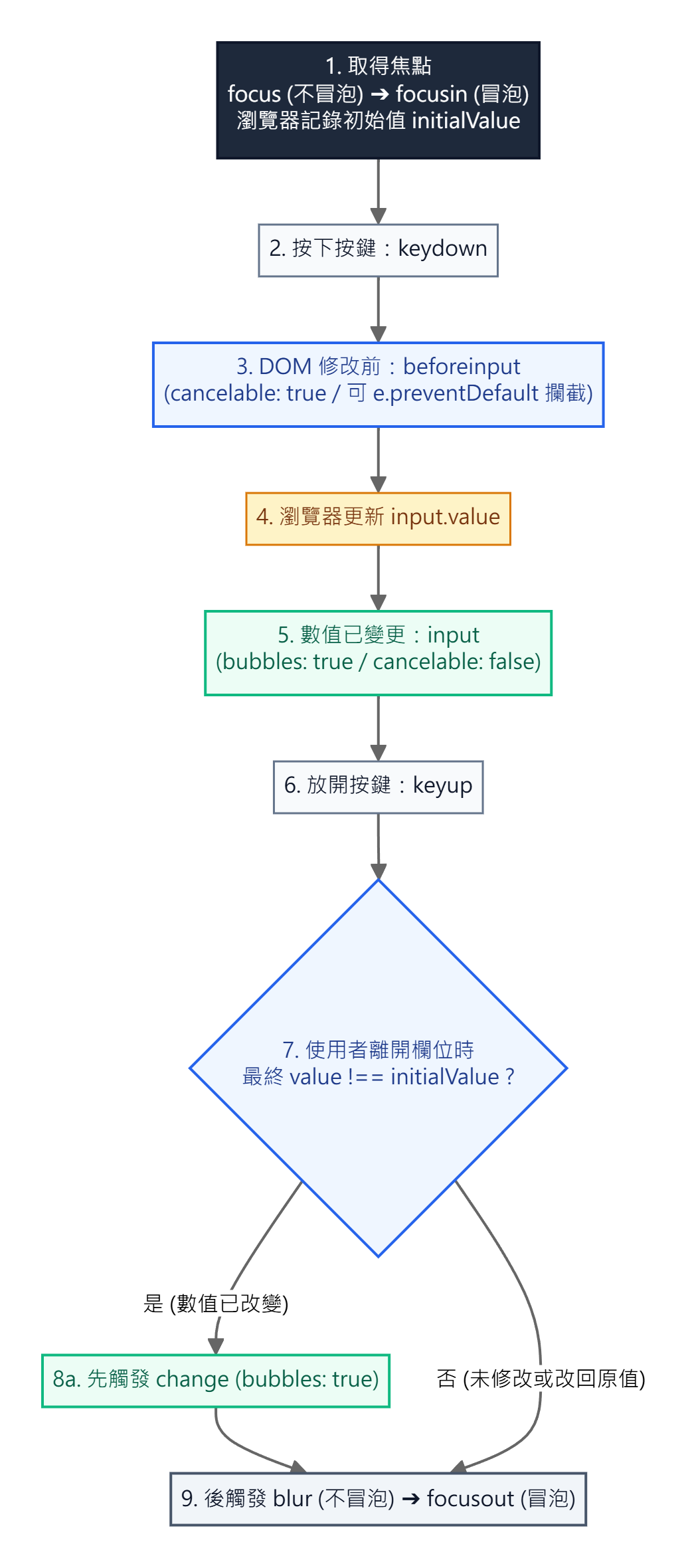
根據 WHATWG HTML Standard §6.6.4 焦點處理模型的 focus update steps:
- 若使用者離開欄位時,欄位的當前
.value與當初取得焦點(focus)時的初始值不同:瀏覽器會先觸發change事件,接著才觸發blur與focusout事件。 - 若使用者聚焦後完全沒打字,或者打了
"abc"又按 Backspace 刪回原本的值才離開:瀏覽器不會觸發change事件,只會觸發blur與focusout。
此外,依 WHATWG HTML Standard §4.10.5.5,change 的觸發時機依控制項類型分為三類:
- 延遲至失焦提交(Unfocus Commit):
<input type="text">、search、tel、url、email、password、number與<textarea>這類以打字修改、沒有明確提交動作的欄位,change在失去焦點時才觸發。 - 選取當下立即提交(Immediate Commit):
<input type="checkbox">、<input type="radio">、<input type="file">與<select>下拉選單,使用者完成勾選或選取當下就觸發。 - 明確提交動作時觸發(Explicit Commit):
<input type="range">用滑鼠拖曳時,拖動過程只觸發input,放開滑桿才觸發change;<input type="color">若是開啟色盤、關閉時才寫入值的介面,change會在關閉色盤時觸發。
3. 表單事件委派(Event Delegation)陷阱:blur 不會冒泡!
當表單中有 20 個 <input> 欄位時,若想在父層 <form> 統一掛載一個監聽器來處理所有欄位的失焦校驗,千萬不能寫 form.addEventListener('blur', ...)!
因為 focus 與 blur 原生不冒泡(bubbles: false)。若要在 <form> 層級透過事件冒泡統一監聽,必須改用會冒泡的 focusin 與 focusout(或是將 blur 的第三個參數設為 { capture: true } 走捕獲階段):
const formEl = document.getElementById('registration-form');

// 🟢 正確:focusout 支援事件冒泡,可在父層 <form> 統一攔截所有子欄位的失焦事件
formEl.addEventListener('focusout', (event) => {
  if (event.target.matches('input, textarea, select')) {
    validateSingleField(event.target);
  }
});
三、中文注音 IME 輸入法衝突與跨瀏覽器時序實務
在開發繁體中文(注音、倉頡)或日韓語系網站時,使用者在輸入框敲擊 ㄋ、ㄧ、ˇ 的選字過程中,每按一下鍵都會觸發 input 事件。若未加防護,不僅會把注音符號直接送進搜尋 API,若搭配字數截斷邏輯更會直接打斷使用者的選字框!
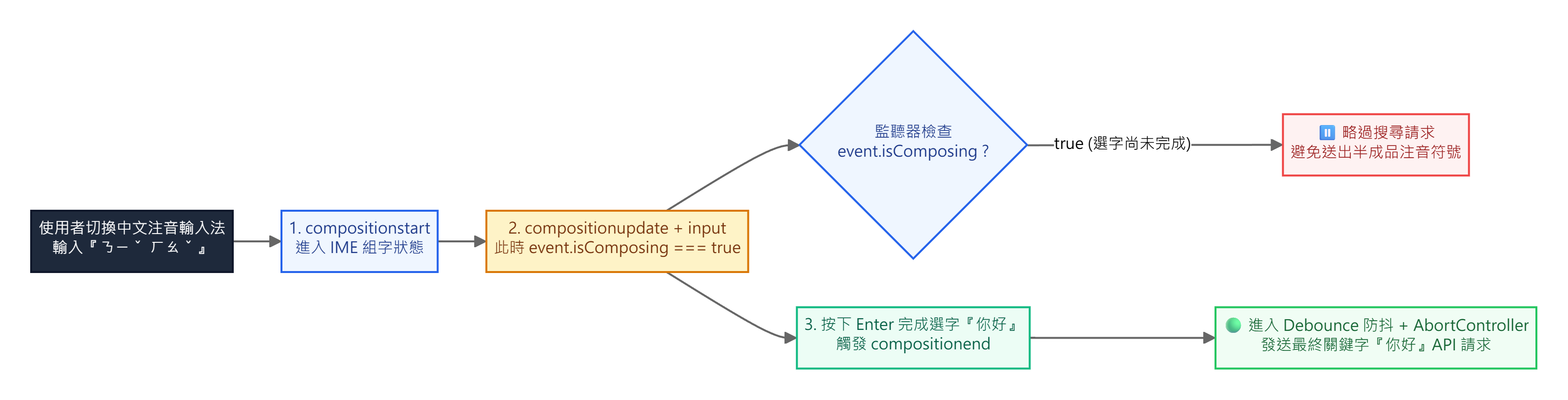
event.isComposing 攔截半成品拼音,並於 compositionend 發送最終查詢之時序圖原生 event.isComposing 與 Chromium / WebKit 跨瀏覽器時序差異
無須自己宣告全域布林變數,W3C UI Events InputEvent.isComposing 已在每一個 input 與 beforeinput 事件物件上原生提供 event.isComposing 屬性(處於 IME 選字期間為 true,一般輸入為 false)。
但實務上有一個關鍵的時序細節:
- 規格順序(Chrome 依此實作):依 W3C UI Events §3.6.6 Input Events During Composition,組字期間每次更新的順序是
beforeinput→compositionupdate→input,最後才是compositionend。也就是說,選字完成上字的那一次input事件,event.isComposing仍為true,而且先於compositionend觸發。以 Chrome 156 為例,注音組字ㄋ→ㄋㄧˇ→ 上字「你」的事件順序如下:
compositionstart
compositionupdate
beforeinput[insertCompositionText] isComposing=true  value=""
input[insertCompositionText]       isComposing=true  value="ㄋ"
compositionupdate
beforeinput[insertCompositionText] isComposing=true  value="ㄋ"
input[insertCompositionText]       isComposing=true  value="ㄋㄧˇ"
compositionupdate
beforeinput[insertCompositionText] isComposing=true  value="ㄋㄧˇ"
input[insertCompositionText]       isComposing=true  value="你"
compositionend                                       value="你"
因此若只在 input 判斷 if (event.isComposing) return;,中文選字完成的那一刻將不會觸發搜尋,必須同時監聽 compositionend 來補觸發。
- 不同瀏覽器與輸入法的實作差異:各瀏覽器、作業系統與輸入法的組字事件順序不一定與規格完全一致,例如上字後可能再多送一次
isComposing為false的input。因此前面的「30 秒複製即用範本」中加入了if (keyword === lastQueriedValue) return;與 Debounce,讓同一個最終值只送出一次請求。
四、UX 黃金實踐:「延遲顯示錯誤、立即消除錯誤(Reward Early, Punish Late)」
在設計表單即時驗證時,如果使用者才剛打出第一個字母 a,畫面就立刻透過 input 事件跳出紅字「Email 格式錯誤!」,會造成極大的操作壓迫感。
常見的表單驗證互動模式是結合 blur(或 focusout)與 input 的 「Reward Early, Punish Late(晚懲罰、早獎勵)」 策略:
- 初次輸入階段(尚未失焦):使用者正在打字時,不顯示紅字錯誤訊息。
- 離開欄位瞬間(
focusout/blur):當使用者填完離開欄位時,執行格式檢核;若不合法,將該欄位標記為data-touched="true"並顯示錯誤提示。 - 修正錯誤階段(
input):一旦欄位曾顯示錯誤(data-touched="true"),當使用者回到欄位修正字元的每一個瞬間(input),立即重新檢核,一旦格式正確馬上消除紅字錯誤給予正向回饋!
const emailField = document.getElementById('user-email');
const emailError = document.getElementById('user-email-error');

function checkEmail(el) {
  const isValid = el.checkValidity();
  el.setAttribute('aria-invalid', String(!isValid));
  emailError.hidden = isValid;
}

// 1. 離開欄位時(Punish Late):標記已接觸並執行首次檢核
emailField.addEventListener('blur', (e) => {
  e.target.dataset.touched = 'true';
  checkEmail(e.target);
});

// 2. 修正輸入時(Reward Early):若欄位已標記為 touched,打字當下立即更新驗證狀態
emailField.addEventListener('input', (e) => {
  if (e.target.dataset.touched === 'true' && !e.isComposing) {
    checkEmail(e.target);
  }
});
五、常見錯誤與踩坑排查 (Pitfalls & Troubleshooting)
1. 用 JavaScript 直接修改 input.value = '新值' 為何不會觸發 input 或 change?
根據 WHATWG HTML Standard §4.10.5.5,input 與 change 事件只在使用者操作控制項修改數值時由瀏覽器派發;規格明訂腳本修改表單控制項的值時不會觸發這兩個事件,因此執行 input.value = 'abc' 不會有任何監聽器被叫起來。
若在自動化腳本或第三方套件整合時需要以程式碼修改數值並通知監聽器,必須手動派發冒泡事件。目標網頁若使用 React 受控元件還要多一步:React 會在 input 節點實例上以 Object.defineProperty 包裝 value 屬性,並用 _valueTracker 記錄目前的值;直接 inputEl.value = ... 會同步更新這個追蹤值,React 因此判定值沒變而不觸發 onChange。做法是呼叫原生 HTMLInputElement.prototype 的 Setter 再派發事件:
function setNativeInputValue(inputEl, newValue) {
  // 取得原生 HTMLInputElement.prototype 上的 value setter,繞過 React _valueTracker 攔截
  const nativeSetter = Object.getOwnPropertyDescriptor(
    window.HTMLInputElement.prototype,
    'value'
  ).set;
  nativeSetter.call(inputEl, newValue);

  // 主動派發具備 bubbles: true 的 input 事件
  inputEl.dispatchEvent(new Event('input', { bubbles: true }));
}
2. React 的 onChange 與原生 DOM onchange 的差異
在原生 HTML 與 Vue(v-on:change)中,change 事件遵循 HTML 標準,文字框要等到失焦才會觸發;但在 React JSX 中,依 React 官方文件,<input> 的 onChange 在使用者每次修改值時就觸發(例如每次按鍵),行為與原生 input 事件相同。若從 React 切換回原生 Vanilla JS 或 Web Components 開發,請務必改用 addEventListener('input', ...)。
六、總結與官方規範參考文獻
掌握 HTML input 事件 的完整生命週期,能讓前端表單兼具流暢體驗與高穩定度:
- 攔截非法輸入:在 DOM 變更前使用
beforeinput(cancelable: true)。 - 即時搜尋與字數計算:使用
input搭配event.isComposing、compositionend、Debounce 與AbortController。 - 下拉選單、Checkbox 與檔案上傳:使用立即觸發的
change事件。 - 表單欄位驗證:結合
focusout(失焦首次檢核)與input(修正時即時消除錯誤)實踐「Reward Early, Punish Late」。
官方權威參考文獻
- W3C UI Events Specification — Event Types (
focusin,beforeinput,input,compositionend) - W3C Input Events Level 2 — The
beforeinputandinputevents - WHATWG HTML Standard §4.10.5.5 — Common event behaviors (
inputandchangeevents) - WHATWG HTML Standard §6.6.4 — Focus processing model(focus update steps:
change先於blur) - React 官方文件 —
<input>(onChange行為) - MDN Web Docs —
HTMLElement: input event - MDN Web Docs —
HTMLElement: beforeinput event - MDN Web Docs —
HTMLElement: change event - MDN Web Docs —
InputEvent: isComposing property - MDN Web Docs —
Element: compositionend event




發佈留言