



next/form 匯出的 <Form> 元件是 Next.js 對 HTML <form> 的擴充:action 傳字串時,表單以 GET 把欄位變成網址的 query string,再用 client-side navigation 換頁,並在表單出現在畫面上時預先載入(prefetch)目的地路由;action 傳函式時,就交給 React 執行 Server Action。<Form> 從 Next.js 15 開始提供,本文範例在 Next.js 16.4.3(App Router、React 19.3.0)執行。GET 與 POST 表單本身的差異可以先看 HTML Form GET 與 POST 差異比較與常見使用場景解析;Server Action 的寫法與安全檢查在 Next.js use server 指令用法 有完整說明,本文只講 <Form> 元件本身。
next/form 基本寫法:搜尋表單導向結果頁
從 next/form 匯入預設匯出的 Form,action 填結果頁的路徑。表單裡每個有 name 的欄位,送出時都會變成 query string 的一組參數:
// app/tests/nextjs-form-component/page.tsx
import Form from 'next/form'
import SearchButton from './search-button'

export default function Page() {
  return (
    <>
      <h1>next/form 範例</h1>
      <Form action="/tests/nextjs-form-component/search">
        <input name="query" placeholder="關鍵字" />
        <select name="sort" defaultValue="new">
          <option value="new">最新</option>
          <option value="hot">熱門</option>
        </select>
        <SearchButton />
      </Form>
    </>
  )
}
輸入 next form、排序選「熱門」後送出,網址變成:
/tests/nextjs-form-component/search?query=next+form&sort=hot這和原生 <form> 的 GET 送出相同:HTML 規格中 method 沒寫時預設就是 GET,GET 送出時瀏覽器把欄位序列化成 application/x-www-form-urlencoded,設成 action 網址的 query。差別在於 <Form> 送出時改用 Next.js 的 client-side navigation 換頁,不重新載入整頁,共用的 layout 與 Client Component 的 state 會保留。
下面兩張圖用同一個 layout 比較:layout 裡放一個 Client Component 計數器,先按兩次,再分別用 <Form> 和原生 <form> 送出同樣的搜尋。
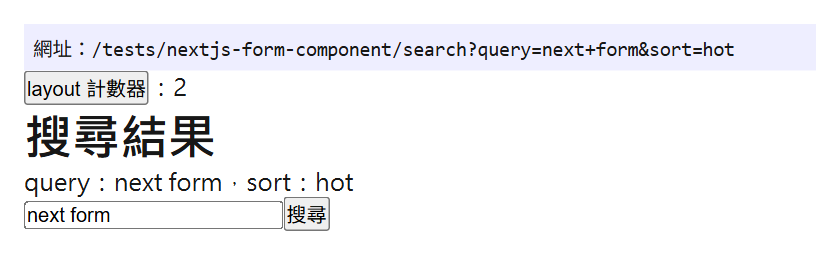
<Form> 送出後的結果頁,layout 計數器維持 2。Next.js 16.4.3 next start,Chrome 156 無頭模式,Windows 11
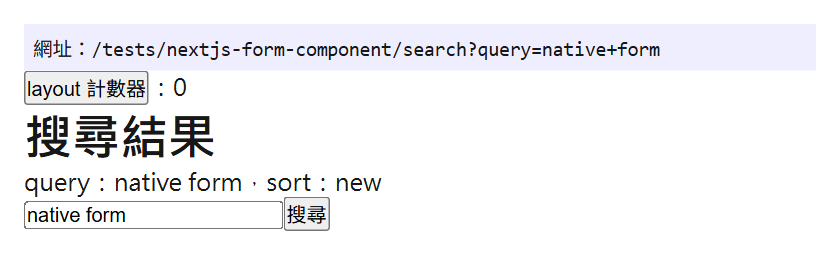
原生 <form> 送出後整頁重新載入,layout 計數器回到 0。Next.js 16.4.3 next dev,Chrome 156 無頭模式,Windows 11
從 Network 看,<Form> 送出時是一個帶 RSC: 1 標頭的 fetch 請求,原生 <form> 則是重新請求整份 HTML 文件:
<Form>   GET Fetch    /tests/nextjs-form-component/search?query=next+form&sort=hot&_rsc=...  RSC: 1
<form>   GET Document /tests/nextjs-form-component/search?query=native+form
結果頁用 searchParams 讀取查詢
結果頁從 page.tsx 的 searchParams prop 取得 query string。Next.js 16 的 searchParams 是 Promise,要先 await:
// app/tests/nextjs-form-component/search/page.tsx
import Form from 'next/form'
import SearchButton from '../search-button'

export default async function SearchPage({
  searchParams,
}: {
  searchParams: Promise<{ [key: string]: string | string[] | undefined }>
}) {
  const { query = '', sort = 'new' } = await searchParams
  await new Promise((r) => setTimeout(r, 1000)) // 模擬查詢資料的時間

  return (
    <>
      <h1>搜尋結果</h1>
      <p>
        query:{String(query)},sort:{String(sort)}
      </p>
      <Form action="" replace>
        <input name="query" defaultValue={String(query)} />
        <SearchButton />
      </Form>
    </>
  )
}
同一層放 loading.tsx,查詢還沒完成時先顯示載入畫面:
// app/tests/nextjs-form-component/search/loading.tsx
export default function Loading() {
  return <p>載入搜尋結果中…</p>
}
範本專案的 next.config.ts 開了 cacheComponents: true。這個設定下,後面 Server Action 範例的文章頁 posts/[id]/page.tsx 一開始沒有 loading.tsx,讀取 params 時 next dev 出現下面的錯誤;錯誤訊息建議用 <Suspense> 包住讀取的部分,或設定 export const instant = false 允許阻塞。在同一層加上 loading.tsx 後錯誤就消失了:
Error: Route "/tests/nextjs-form-component/posts/[id]": Next.js encountered runtime data during prerendering.

`cookies()`, `headers()`, `params`, or `searchParams` accessed outside of `<Suspense>` prevents the route from being prerendered, blocking the page load and leading to a slower user experience.
action 傳字串與傳函式的差別
<Form> 的行為取決於 action 是字串還是函式:
action 為字串 | action 為函式(Server Action) | |
|---|---|---|
| 送出方式 | GET,欄位編碼成目的地網址的 query string | POST,React 把 FormData 傳給 Server Action |
| 換頁 | client-side navigation 到 action 指定的網址 | 不換頁;需要時在 Server Action 裡呼叫 redirect |
| 預先載入 | 表單可見時 prefetch 目的地的共用 UI(layout.js、loading.js) | 送出前不知道目的地,無法自動 prefetch |
| 可用的 props | replace、scroll、prefetch | replace、scroll 會被忽略 |
| 適合的情境 | 搜尋、篩選、分頁這類只改網址參數的表單 | 新增、修改、刪除資料 |
replace、scroll、prefetch props
action 為字串時可以加這三個 props:
| Prop | 預設值 | 作用 |
|---|---|---|
replace | false | true 時取代目前的 history 紀錄,不新增一筆 |
scroll | true | 導向後捲到新路由頂端;上一頁、下一頁維持原本的捲動位置 |
prefetch | 預先載入(型別預設 null) | 表單進入畫面時預先載入目的地;傳 false 關閉 |
action="" 代表導向目前路由、只更新 query string。上面結果頁的第二個表單就是 action="" replace:在結果頁再搜尋一次,網址更新,但 history.length 送出前後都是 3,沒有多一筆上一頁紀錄(第一次從首頁用 <Form> 送出時是 2 → 3)。
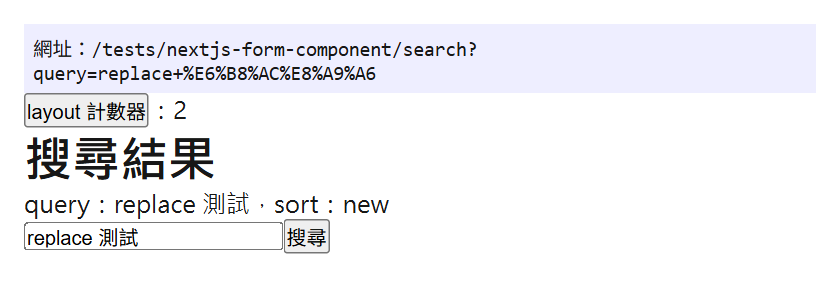
結果頁用 action="" replace 再搜尋一次,原本的 sort=hot 不見了。Next.js 16.4.3 next start,Chrome 156 無頭模式,Windows 11
圖中的 sort 從 hot 變回預設的 new:GET 送出時,query string 整段由表單欄位重新產生,不會和目前網址的參數合併。這個表單只有 query 欄位,sort 就被丟掉了。要保留其他參數,用 hidden input 一起送出(見後面的注意事項)。
prefetch 只在 production 生效
Next.js 在開發模式(next dev)不做 prefetch,要用 next build 加 next start 才看得到。在 next start 下開啟搜尋表單頁,還沒送出前 Network 就出現目的地路由的 prefetch 請求(帶 Next-Router-Prefetch: 1 標頭);改成 prefetch={false} 後,頁面載入時就沒有這個請求:
預設            GET Fetch /tests/nextjs-form-component/search?_rsc=...  RSC: 1  Next-Router-Prefetch: 1
prefetch={false}  (沒有 prefetch 請求)
送出後,畫面先顯示目的地的 loading.tsx,資料好了再換成結果:
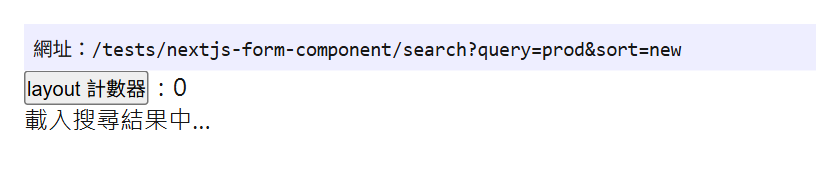
送出約 0.1 秒後的畫面,網址已更新,內容是 loading.tsx。Next.js 16.4.3 next start,Chrome 156 無頭模式,Windows 11
官方文件的 props 表把 prefetch 範例寫成 prefetch={true},但 Next.js 16.4.3 的型別定義是 prefetch?: false | null。傳 true 時,next build 的型別檢查會失敗:
app/tests/nextjs-form-component/caveats/page.tsx(8,58): error TS2322: Type 'true' is not assignable to type 'false'.next dev 的瀏覽器 Console 也會出現:
The `prefetch` prop of <Form> must be `false` or `null`要預先載入就不要寫 prefetch,要關閉才寫 prefetch={false}。
用 useFormStatus 顯示送出中
還沒預先載入完成、或 loading.tsx 還沒出現前,可以用 React 的 useFormStatus 在按鈕上顯示送出中。useFormStatus 只讀得到父層 <form> 的狀態,所以按鈕要拆成獨立的 Client Component,放在 <Form> 裡面:
// app/tests/nextjs-form-component/search-button.tsx
'use client'

import { useFormStatus } from 'react-dom'

export default function SearchButton() {
  const status = useFormStatus()
  return <button type="submit">{status.pending ? '搜尋中…' : '搜尋'}</button>
}
在 next dev(沒有 prefetch)送出後約 0.15 秒,畫面還停在原本的頁面,按鈕文字已經變成「搜尋中…」。
搭配 Server Action 新增資料
action 傳 Server Action 時,<Form> 就像 React 的 <form>:送出時 React 把表單的 FormData 當成第一個參數傳給 Server Action。新增完成後要導向新頁面,在 Server Action 裡呼叫 redirect:
// app/tests/nextjs-form-component/actions.ts
'use server'

import { redirect } from 'next/navigation'

export async function createPost(formData: FormData) {
  const title = String(formData.get('title') ?? '').trim()
  const id = Date.now().toString(36) // 示範用:實際應寫入資料庫並取得 id
  redirect(`/tests/nextjs-form-component/posts/${id}?title=${encodeURIComponent(title)}`)
}
// app/tests/nextjs-form-component/posts/create/page.tsx
import Form from 'next/form'
import { createPost } from '../../actions'
export default function Page() {
return (
<>
<h1>新增文章</h1>
<Form action={createPost}>
<input name="title" placeholder="標題" />
<button type="submit">建立</button>
</Form>
</>
)
}輸入 Hello Form 送出,瀏覽器先送出一個 POST 到 /tests/nextjs-form-component/posts/create,Server Action 執行 redirect 後導向新文章頁:
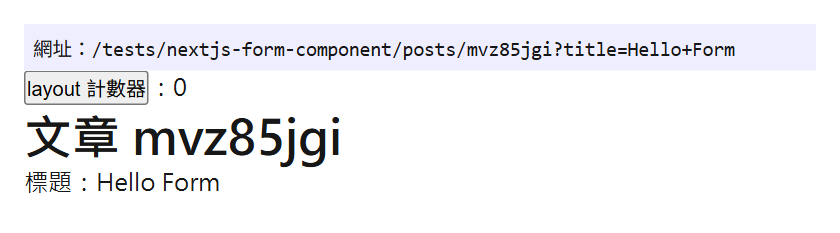
<Form action={createPost}> 送出後由 redirect 導向的文章頁。Next.js 16.4.3 next dev,Chrome 156 無頭模式,Windows 11
action 為函式時,replace 和 scroll 沒有作用。寫了的話,next dev 的 Console 會提示改用 redirect() 或 router.replace():
Passing `replace` or `scroll` to a <Form> whose `action` is a function has no effect.
See the relevant docs to learn how to control this behavior for navigations triggered from actions:
  `redirect()`       - https://nextjs.org/docs/app/api-reference/functions/redirect#parameters
  `router.replace()` - https://nextjs.org/docs/app/api-reference/functions/use-router#userouter
Server Action 要驗證身分與輸入等安全重點,見 Next.js use server 指令用法;依回傳值顯示驗證錯誤可以用 useActionState,寫法在 React 19 useActionState 教學:Server Actions 表單驗證、保留欄位與 useFormStatus 送出狀態。
next/form 注意事項
action 網址裡的 query string 會被忽略
action="/tests/nextjs-form-component/search?sort=hot" 送出後,網址只剩 ?query=qs,sort=hot 不見了,next dev 的 Console 出現警告:
<Form> received an `action` that contains search params: "/tests/nextjs-form-component/search?sort=hot". This is not supported, and they will be ignored. If you need to pass in additional search params, use an `<input type="hidden" />` instead.這和 HTML 規格一致:GET 送出時 query 整段換成表單欄位。固定參數改用 hidden input:
<Form action="/tests/nextjs-form-component/search">
  <input type="hidden" name="sort" value="hot" />
  <input name="query" />
  <button type="submit">搜尋</button>
</Form>
輸入 hidden 送出後,網址是 /tests/nextjs-form-component/search?sort=hot&query=hidden。
不支援 method、encType、target
<Form> 不接受 method、encType、target,這三個會蓋掉 <Form> 的導向行為。Next.js 16.4.3 的型別定義直接排除它們,寫 method="post" 時 next build 型別檢查失敗;next dev 下 Console 出現下面的錯誤,而且 method 被拿掉,表單照樣用 GET 導向 ?query=method:
<Form> does not support changing `method`. If you'd like to use it to perform a mutation, consider making `action` a function instead.要 POST 資料就把 action 改成 Server Action;真的需要這些屬性時改用原生 <form>。按鈕上的 formMethod、formEncType、formTarget 可以覆寫它們,但會退回瀏覽器原生的送出行為。
action 為字串時,file input 只送出檔名
action 為字串時放 <input type="file">,送出的是檔名,不是檔案內容。選一個 avatar.png 送出後,網址是 ?avatar=avatar.png,Console 出現警告:
<Form> only supports file inputs if `action` is a function. File inputs cannot be used if `action` is a string, because files cannot be encoded as search params.這也是 HTML 規格的行為:把表單資料轉成網址參數時,值是 File 物件就改用它的檔名。上傳檔案要用 Server Action。
其他限制
onSubmit:可以加自己的送出處理,但呼叫event.preventDefault()會取消<Form>的導向。key:action為字串時不支援傳key;需要重新渲染或修改資料時,改用函式action。formAction:可以寫在<button>或<input type="submit">覆寫action,一樣是 client-side navigation,但不會 prefetch。有設定basePath時,formAction的路徑要自己加上basePath,例如formAction="/base-path/search"。- JavaScript 停用或還沒載入時:
<Form>退回一般表單的整頁送出。停用 JavaScript 後在搜尋框按 Enter,瀏覽器直接以 GET 請求整份/tests/nextjs-form-component/search?query=no+js&sort=new文件。
只改網址參數的搜尋、篩選表單用 <Form action="路徑">;要寫入資料的表單用 <Form action={serverAction}>。在其他地方用程式更新網址參數、不經過表單時,可以參考 Next.js URL 更新不刷新網頁:shallow routing 與 App Router 參數同步實作。
參考資料與延伸閱讀
- Next.js Docs: Form Component
- Next.js 15 Release Blog: Form Component
- Next.js Docs: instant(開發模式不做 prefetch 的說明)
- Next.js 原始碼:form-shared.tsx(v16.4.3,FormProps 型別)
- React Docs: form
- React Docs: useFormStatus
- HTML Standard: Form submission algorithm
- MDN: form 元素
- HTML Form GET 與 POST 差異比較與常見使用場景解析
- Next.js URL 更新不刷新網頁:shallow routing 與 App Router 參數同步實作
- Next.js use server 指令用法:Server Function 寫法、表單呼叫、可序列化參數與安全性
- React 19 useActionState 教學:Server Actions 表單驗證、保留欄位與 useFormStatus 送出狀態






發佈留言