



useOptimistic 是 React 19 用來做樂觀更新的 Hook:送出資料時先把預期結果畫在畫面上,等 Server Action 結束後再換成伺服器的真實資料,失敗時樂觀項目自動消失。本篇說明它的運作時機,並示範留言串的樂觀更新與失敗回滾。
本篇是 React 19 useActionState 教學:Server Actions 表單驗證、保留欄位與 useFormStatus 送出狀態 的延伸。
"use server"、Server Action 與useActionState的基礎可以先看那一篇,這裡直接從樂觀更新開始。
想直接拿程式碼或排查問題,可以跳到:
一、 useOptimistic 運作機制:樂觀狀態什麼時候出現、什麼時候消失
useOptimistic 從 'react' 匯入,寫法是 const [optimisticState, setOptimistic] = useOptimistic(value, reducer?),恰好回傳兩個值:
optimisticState:沒有進行中的 Action 時,它就等於傳入的value;Action 進行中,才會等於reducer算出的值(沒給reducer時,就是傳給 setter 的值)。setOptimistic:只能在 Action 內更新樂觀狀態的函式。reducer(currentState, action)是選填的純函式,接收目前狀態與 setter 傳入的參數,回傳下一個樂觀狀態。
所以樂觀狀態只存在於「Action 進行中」這段時間,Action 一結束,畫面一律回到 value 的當下值。接下來的行為都從這點推得出來:
- 成功時:新資料要反映在
value上,畫面才會留著新項目。在 Next.js 中,通常由 Server Action 呼叫revalidatePath等函式,讓父層 Server Component 重新渲染、傳入新的value。沒有更新value,樂觀項目在 Action 結束後同樣會消失。 - 失敗時:Action 拋出錯誤,Transition 仍會結束,React 以當下的
value渲染。父層通常只在成功時更新value,所以失敗時畫面自然回到樂觀更新前的樣子,等同回滾;需要提示時自己 catch 錯誤或判斷回傳值顯示訊息。 - Action 進行中
value改變:React 會用新的value重新執行reducer,樂觀項目會疊在最新資料上。如果改用setOptimistic(prev => [...prev, item])這種 updater 寫法,只看得到 Transition 開始時的狀態。 - 呼叫位置:setter 必須在 Action 內呼叫。傳給
<form action>這類 Action prop 的函式可以直接呼叫,其他地方要包在startTransition內;在 Action 之外呼叫時,React 會顯示警告,樂觀狀態只會短暫出現就恢復原值。
二、 實作範本:留言串樂觀更新與失敗自動回滾
範本:結合 useOptimistic 與 Action Transition 實作留言樂觀更新與失敗自動回滾
對於「收藏文章」、「切換待辦事項完成狀態」或「即時送出討論區留言」等高頻率互動,等待伺服器往返會讓介面顯得遲鈍。透過 useOptimistic 搭配表單 Action Transition,我們可以在呼叫 Server Action 的同一瞬間先在畫面上渲染帶有「傳送中」標記的樂觀項目;成功或失敗之後的畫面變化,照第一節的規則運作:
// 檔案:app/discussion/CommentThread.tsx
"use client";

import { useOptimistic, useRef, useState } from "react";

export interface CommentItem {
  id: string;
  text: string;
  sending?: boolean;
}

interface CommentThreadProps {
  initialComments: CommentItem[];
  // 由父層 Server Component 傳入或從 "use server" 模組匯入的 Server Function
  postCommentAction: (formData: FormData) => Promise<{ ok: boolean; error?: string }>;
}

export default function CommentThread({
  initialComments,
  postCommentAction,
}: CommentThreadProps) {
  const formRef = useRef<HTMLFormElement>(null);
  const [errorMsg, setErrorMsg] = useState<string | null>(null);

  // 定義樂觀狀態:在真實 initialComments 基礎上,疊加正在傳送中的新留言
  const [optimisticComments, addOptimisticComment] = useOptimistic<
    CommentItem[],
    string
  >(initialComments, (currentComments, newText) => [
    ...currentComments,
    {
      id: `temp-${Date.now()}`,
      text: newText,
      sending: true,
    },
  ]);

  async function handleFormAction(formData: FormData) {
    const rawText = formData.get("commentText");
    const text = typeof rawText === "string" ? rawText.trim() : "";
    if (!text) return;

    setErrorMsg(null);
    // 1. 立即觸發樂觀更新(此時處於 <form action> 自動開啟的 Transition 內)
    addOptimisticComment(text);
    // 2. 立即清空輸入框,讓使用者可無縫輸入下一則
    formRef.current?.reset();

    // 3. 呼叫伺服器端 Server Action
    const result = await postCommentAction(formData);
    if (!result.ok) {
      // 當 Action 結束且父層 initialComments 未更新時,樂觀項目會自動回滾消失
      setErrorMsg(result.error ?? "留言發送失敗,系統已自動還原畫面。");
    }
  }

  return (
    <section aria-label="技術討論串" className="space-y-4">
      <ul className="space-y-2">
        {optimisticComments.map((item) => (
          <li
            key={item.id}
            className="p-3 rounded border border-slate-200 flex items-center justify-between"
          >
            <span>{item.text}</span>
            {item.sending && (
              <span className="text-xs text-slate-400 italic">
                (傳送中...)
              </span>
            )}
          </li>
        ))}
      </ul>

      {errorMsg && (
        <p role="alert" className="text-sm text-red-600">
          {errorMsg}
        </p>
      )}

      <form ref={formRef} action={handleFormAction} className="flex gap-2">
        <label htmlFor="comment-input" className="sr-only">
          輸入討論內容
        </label>
        <input
          id="comment-input"
          name="commentText"
          type="text"
          required
          placeholder="輸入您的技術見解..."
          className="flex-1 border rounded px-3 py-2"
        />
        <button
          type="submit"
          className="px-4 py-2 rounded bg-slate-900 text-white"
        >
          發送留言
        </button>
      </form>
    </section>
  );
}
下面兩張圖是在父層 Server Component 讀取留言、Server Action 成功時呼叫 revalidatePath 的條件下執行的畫面。送出後輸入框立刻清空,新留言先帶著「(傳送中…)」標記出現:
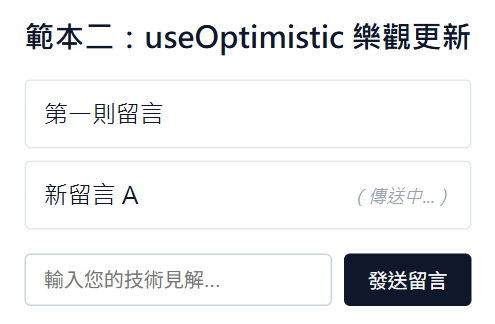
圖:伺服器尚未回應時,useOptimistic 先渲染樂觀項目(Next.js 16.4.3、React 19.3.0、Chrome 156 無頭模式執行畫面)
伺服器回傳 { ok: false } 時,樂觀項目在 Action 結束後消失,畫面只留下錯誤訊息與原本的留言:
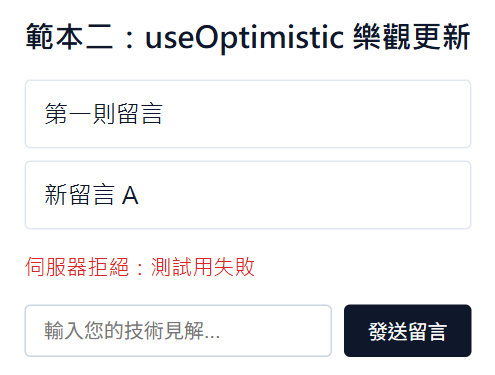
圖:Action 失敗、initialComments 未更新,樂觀項目自動消失(Next.js 16.4.3、React 19.3.0、Chrome 156 無頭模式執行畫面)
三、 常見問題(Q&A)
Q:不在 form 內的一般按鈕點擊事件,該如何安全觸發 Server Action?
原因說明:並非所有資料異動都帶有輸入框(例如「按讚按鈕」、「複製專案按鈕」或「切換封存狀態」)。若直接在 onClick={async () => await toggleLike(id)} 中裸呼叫 Server Function,該次更新不在 Transition 裡,無法用 isPending 顯示載入狀態;此時呼叫 useOptimistic 的 setter,React 會在開發模式顯示警告,樂觀狀態只會閃一下就恢復原值。React 官方文件建議在表單之外呼叫 Server Function 時,一律包在 Transition 內。
解法:有兩種解法可供選擇:
- 使用
useTransition包覆呼叫:宣告const [isPending, startTransition] = useTransition(),並在onClick中執行startTransition(async () => { await toggleLike(id); })。 - 使用隱藏表單與
.bind():透過const boundAction = toggleLike.bind(null, id)預先綁定參數並傳給極簡的<form action={boundAction}><button type="submit">...</button></form>,同時保有漸進式增強優勢。






發佈留言