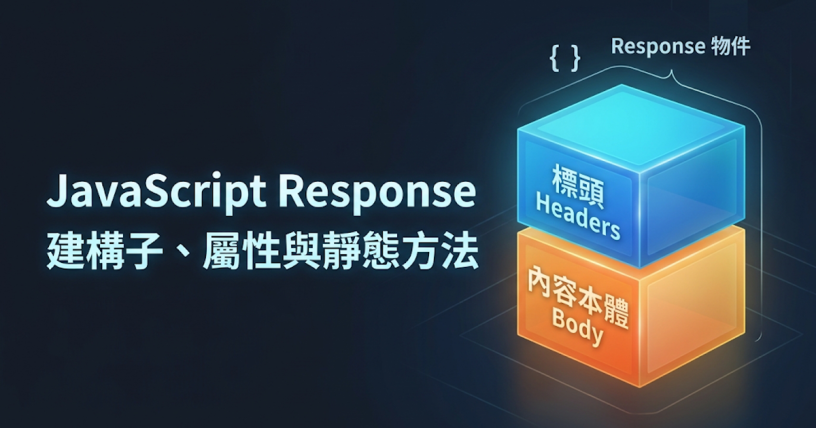

JS Response 指的是 Fetch API 的 Response 介面,代表對一個請求的回應。MDN 提到,常見的來源是 fetch() 回傳的結果,或 service worker 裡 FetchEvent.respondWith() 的內容;也可以用 new Response() 自己建立。
本篇只講 Response 物件本身:建構子、三個靜態方法、屬性與 clone()。讀取 body 的方法只列名稱,json()、text()、blob() 各有專文;請求端的 Request 物件也另有專文。fetch() 怎麼送出、HTTP 錯誤怎麼處理,站上的 JS fetch() 與 JS Fetch API 兩篇有說明,本篇不重講。
語法與參數
new Response()
new Response(body)
new Response(body, options)| 參數 | 說明 |
|---|---|
body | 選用,預設 null。可以是 Blob、ArrayBuffer、TypedArray、DataView、FormData、ReadableStream、URLSearchParams 或字串 |
options | 選用的物件,可設 status、statusText、headers |
options 的三個設定:
| 選項 | 預設 | 說明 |
|---|---|---|
status | 200 | 回應的狀態碼 |
statusText | 空字串 | 對應狀態碼的訊息,例如 OK |
headers | 空 | Headers 物件,或以標頭名稱為鍵的物件字面值 |
建立回應並讀取預設值
下面的範例只傳一個字串當 body,看各屬性的預設值:
const plain = new Response("hello");

console.log(plain.status);                         // 200
console.log(JSON.stringify(plain.statusText));     // ""
console.log(plain.ok);                             // true
console.log(plain.type);                           // default
console.log(JSON.stringify(plain.url));            // ""
console.log(plain.redirected);                     // false
console.log(plain.headers.get("Content-Type"));    // text/plain;charset=UTF-8
console.log(await plain.text());                   // hello
Fetch 規範規定,body 有型別資訊、而 headers 裡沒有 Content-Type 時,建構子會補上:字串是 text/plain;charset=UTF-8,URLSearchParams 是 application/x-www-form-urlencoded;charset=UTF-8,Blob 用它自己的 type。
自己建立的回應,type 是 default;這個值出現在規範的列舉裡,MDN 的 type 頁面沒有列。
建構時的檢查
Fetch 規範規定,建構子在下列情況會丟出例外:
status不在 200 到 599 之間:RangeError。statusText不是空字串、又不符合 reason-phrase 的格式:TypeError。- 狀態碼是
101、103、204、205、304(規範稱為 null body status)卻帶了 body:TypeError。
const errorName = (fn) => {
  try {
    fn();
    return "no error";
  } catch (error) {
    return error.name;
  }
};

console.log(errorName(() => new Response("x", { status: 600 })));       // RangeError
console.log(errorName(() => new Response("x", { status: 204 })));       // TypeError
console.log(errorName(() => new Response(null, { status: 204 })));      // no error
console.log(errorName(() => new Response("x", { status: 404 })));       // no error
三個靜態方法
Response 有三個靜態方法,可以直接建立特定用途的回應,不必先建構:
| 方法 | 用途 |
|---|---|
Response.error() | 回傳代表網路錯誤的回應 |
Response.json(data, options) | 回傳 body 是指定 JSON 資料的回應 |
Response.redirect(url, status) | 回傳重新導向到指定網址的回應 |
Response.error()
Response.error() 回傳一個和網路錯誤關聯的回應,type 是 error。MDN 說明,它主要用在 service worker:在 fetch 事件處理函式裡回傳它,主程式裡對應的 fetch() 就會被拒絕。
const failed = Response.error();

console.log(failed.type);     // error
console.log(failed.status);   // 0
console.log(failed.body);     // null
Response.json()
Response.json(data, options) 回傳一個 body 是 data 序列化結果的回應,Content-Type 自動設成 application/json。options 和建構子的一樣,可設 status、statusText、headers。
MDN 提到,service worker 可以用它把快取的 JSON 資料組成回應,伺服器端程式碼也可以用它回傳 JSON。
const jsonResponse = Response.json({ my: "data" });

console.log(jsonResponse.status);                         // 200
console.log(jsonResponse.headers.get("Content-Type"));    // application/json
console.log(JSON.stringify(await jsonResponse.json()));   // {"my":"data"}

const created = Response.json({ id: 1 }, { status: 201, statusText: "Created" });

console.log(created.status);                              // 201
console.log(created.statusText);                          // Created
data 無法轉成 JSON 字串時會丟 TypeError。MDN 舉的情況有:物件有循環參考,或傳入 undefined。
const circular = {};
circular.self = circular;

console.log(errorName(() => Response.json(circular)));    // TypeError
console.log(errorName(() => Response.json(undefined)));   // TypeError
Response.redirect()
Response.redirect(url, status) 回傳一個重新導向到 url 的回應。status 選用,只能是 301、302、303、307、308,沒傳時是 302。
const moved = Response.redirect("https://www.example.com", 301);
const found = Response.redirect("https://www.example.com");

console.log(moved.status);                       // 301
console.log(found.status);                       // 302
console.log(moved.headers.get("Location"));      // https://www.example.com/
status 不是上面五個重新導向狀態碼時丟 RangeError,網址無效時丟 TypeError:
console.log(errorName(() => Response.redirect("https://www.example.com", 200)));   // RangeError
console.log(errorName(() => Response.redirect("http://[bad")));                     // TypeError
MDN 說明,它可以搭配 service worker:控制頁面的 service worker 攔截請求後,可以回傳這種回應,把請求導向別處。
屬性
下表整理 MDN 列出的唯讀屬性:
| 屬性 | 內容 |
|---|---|
status | 狀態碼,成功是 200;type 是 opaque、opaqueredirect、error 的回應是 0 |
statusText | 對應狀態碼的訊息,預設空字串;HTTP/2 沒有狀態訊息 |
ok | 狀態碼在 200 到 299 之間是 true |
headers | 回應的 Headers 物件 |
url | 回應的網址,是重新導向後的最終網址 |
redirected | 回應是否為重新導向的結果(網址清單不只一筆) |
type | 回應的類型,決定腳本能不能讀 body 與標頭 |
body、bodyUsed | body 的 ReadableStream,以及 body 是否已被讀過 |
用 fetch() 發出請求,可以看到各屬性實際的值。下面的 fetch() 抓的都是同來源的網址,其中 /old 會被伺服器重新導向到 /new:
const okResponse = await fetch("/products.json");

console.log(okResponse.ok);                // true
console.log(okResponse.status);            // 200
console.log(okResponse.type);              // basic
console.log(okResponse.redirected);        // false
console.log(okResponse.url);               // https://example.org/products.json

const missing = await fetch("/missing");

console.log(missing.ok);                   // false
console.log(missing.status);               // 404

const redirected = await fetch("/old");

console.log(redirected.redirected);        // true
console.log(redirected.url);               // https://example.org/new
type 的五種值
type 決定腳本能不能存取回應的 body 與標頭:
type | 什麼時候出現 | 能讀到的內容 |
|---|---|---|
basic | 同來源請求、data: 網址,或請求模式是 navigate、websocket | 除了 Set-Cookie 之外的標頭 |
cors | 跨來源請求,且 CORS 處理成功 | 只有 CORS-safelisted 的回應標頭 |
error | 發生網路錯誤 | status 是 0、body 是 null、標頭空且不可修改 |
opaque | 請求模式是 no-cors 的跨來源請求 | 同上,腳本讀不到內容 |
opaqueredirect | redirect 選項是 manual,且伺服器回了重新導向 | 同上 |
MDN 特別說明,fetch() 不會回傳 error 型別的回應,因為網路錯誤時 Promise 是被拒絕的;error 型別只會從 Response.error() 拿到。
下面兩個範例,一個是 CORS 成功的跨來源請求,一個是 no-cors 的請求:
const corsResponse = await fetch("https://api.example.net/data.json");

console.log(corsResponse.type);       // cors

const opaque = await fetch("https://api.example.net/data.json", { mode: "no-cors" });

console.log(opaque.type);             // opaque
console.log(opaque.status);           // 0
console.log(opaque.body);             // null
redirected 不能用來擋重新導向
MDN 提醒,用 redirected 判斷「有沒有被重新導向」可以,但不適合拿來阻止重新導向:收到回應時,重新導向已經發生,請求可能已經送到非預期的目的地,帶著敏感資訊。要擋的話,應該在呼叫 fetch() 時就設 redirect: "error"。
body 與讀取方法
body 是一個 ReadableStream;沒有 body 的回應,規範規定是 null,用建構子傳 null 建立的回應就是這樣。MDN 註記,目前的瀏覽器並沒有照規範,把沒有 body 的實際 HTTP 回應(例如 HEAD 請求或 204 No Content)的 body 設成 null。
讀取 body 的方法各回傳一個 Promise:
| 方法 | 解析結果 |
|---|---|
text() | 字串 |
json() | 把 body 當 JSON 解析後的 JavaScript 值 |
blob() | Blob |
arrayBuffer() | ArrayBuffer |
bytes() | Uint8Array |
formData() | FormData |
這些方法的用法與例外,json()、text()、blob() 在各自的專文說明。
body 是一次性的串流,讀過就不能再讀,bodyUsed 會變成 true,再讀會被拒絕:
const once = new Response("payload");

console.log(once.bodyUsed);              // false
console.log(await once.text());          // payload
console.log(once.bodyUsed);              // true

try {
  await once.text();
} catch (error) {
  console.log(error.name);               // TypeError
}
clone():複製回應
clone() 回傳一個內容完全相同、存在另一個變數的 Response。因為 body 只能讀一次,想讀兩次(例如一份交給快取、一份自己用)就要先 clone():
const original = new Response("payload");
const copy = original.clone();

console.log(copy === original);          // false
console.log(await original.text());      // payload
console.log(await copy.text());          // payload
body 已經被讀過的回應不能再 clone(),會丟 TypeError;MDN 說,clone() 存在的主要原因就是讓一次性的 body 能被多次使用。
const usedResponse = new Response("x");
await usedResponse.text();

console.log(errorName(() => usedResponse.clone()));   // TypeError
MDN 還提醒,和 ReadableStream.tee() 一樣,複製出來的兩個 body 以較快那一方的速度消費,慢的那一方沒讀的資料會無上限地暫存;如果只讀其中一份,整個 body 都會被緩衝在記憶體。所以 clone() 適合「先後各讀一次」,不適合用不同速度同時讀很大的 body。
注意事項
ok只看狀態碼範圍:200 到 299 才是true;fetch()遇到 404、500 不會拒絕,要自己檢查ok或status。- body 只能讀一次:要重複讀先
clone(),而且要在讀之前。 opaque回應讀不到東西:status是0、body是null,不能用它判斷請求是否成功。- 別用
redirected擋重新導向:用fetch()的redirect: "error"。 - 自己建立回應要遵守狀態碼限制:
status限 200 到 599,204之類不能帶 body。 Response.json()靜態方法與response.json()實例方法不同:前者建立回應,後者讀取 body 並解析。
支援版本
依 MDN 瀏覽器相容性資料(browser-compat-data,查詢日期 2026-11-24):
Response:Chrome 42(40 到 41 只在 service worker 可用)、Edge 14、Firefox 39、Safari 10.1、Node.js 18.0.0、Deno 1.0。MDN 頁面標示為 Baseline「廣泛可用」,自 2017 年 3 月起各主流瀏覽器都支援。Response.error():Chrome 43、Firefox 39、Safari 10.1、Node.js 18.0.0。Response.redirect():Chrome 44、Firefox 39、Safari 10.1、Node.js 18.0.0。Response.json()(靜態方法):Chrome 105、Firefox 115、Safari 17、Node.js 18.3.0,MDN 標示 2023 年 9 月起廣泛可用。body屬性:Chrome 43、Firefox 65、Safari 10.1、Node.js 18.0.0。redirected:Chrome 57、Firefox 49、Safari 10.1、Node.js 18.0.0。bytes():Chrome 132、Firefox 128、Safari 18、Node.js 22.3.0。
補充說明:範例在 Chrome 158 執行(頁面網址
https://example.org/index.html),fetch()的回應由測試程式攔截回傳;重新導向的範例只確認redirected與url。Node.js 22 也有全域Response,建構子、靜態方法與clone()結果相同。建構檢查與補Content-Type依 Fetch 規範。




發佈留言