



Next.js 的 'use cache: private' 指令讓快取函式可以直接呼叫 cookies()、headers() 與讀取 searchParams,這些 API 在一般的 use cache 裡會直接報錯。代價是它不會把結果存進伺服器快取:正式環境中只在同一個請求內重用結果,再由瀏覽器端的路由器依 stale 時間保留。本文以 Next.js 16(範例在 16.4.3 執行)說明寫法、和 use cache 的差別、可用的請求 API 與 stale 的設定方式。use cache 本身的快取鍵、cacheLife profile 與 cacheTag 用法,可以先看 Next.js use cache 指令用法:函式、元件與檔案層級快取、cacheLife 與 cacheTag。
use cache: private 基本寫法
'use cache: private' 和 use cache 一樣屬於 Cache Components,要先在 next.config.ts 開啟 cacheComponents(官方建議同時明確設定 partialPrefetching,沒設定時會輸出警告):
import type { NextConfig } from 'next'

const nextConfig: NextConfig = {
  cacheComponents: true,
  partialPrefetching: true,
}

export default nextConfig
接著在 async 函式第一行寫 'use cache: private',並搭配 cacheLife 設定時間。函式內可以直接讀 cookie 與請求標頭:
import { Suspense } from 'react'
import { cookies, headers } from 'next/headers'
import { cacheLife, cacheTag } from 'next/cache'

// 一般 use cache:沒有讀取請求資料,建置時產生,所有人共用
async function getSharedTime() {
  'use cache'
  cacheLife('hours')
  return new Date().toISOString()
}

// use cache: private:可以直接讀 cookies() 與 headers()
async function getPersonalGreeting(label: string) {
  'use cache: private'
  cacheTag('greeting')
  cacheLife({ stale: 60 })

  const user = (await cookies()).get('user')?.value ?? 'guest'
  const lang = (await headers()).get('accept-language') ?? '未提供'
  return { label, user, lang, at: new Date().toISOString() }
}

async function Personal() {
  const first = await getPersonalGreeting('header')
  const second = await getPersonalGreeting('header')
  return (
    <ul>
      <li>使用者:{first.user}(Accept-Language:{first.lang})</li>
      <li>private 第一次:{first.at}</li>
      <li>private 第二次:{second.at}</li>
    </ul>
  )
}

export default async function Page() {
  const shared = await getSharedTime()
  return (
    <main>
      <h1>use cache: private 範例</h1>
      <p>use cache(共用):{shared}</p>
      <Suspense fallback={<p>載入中…</p>}>
        <Personal />
      </Suspense>
    </main>
  )
}
private 快取函式在請求時才執行,不會納入建置時產生的靜態外殼,所以用到它的元件要放在 <Suspense> 裡,外殼先顯示 fallback,結果再串流進來。
'use cache: private' 的官方版本紀錄寫的是 v16.0.0 起隨 Cache Components 功能啟用。
和 use cache 差在哪:結果存在哪裡
| 項目 | use cache | 'use cache: private' |
|---|---|---|
| 能否直接讀 cookies/headers | 不行,要在外面讀取再當參數傳入 | 可以 |
| 伺服器端快取 | 記憶體或快取處理器 | 無 |
| 快取範圍 | 所有使用者共用 | 每個用戶端(瀏覽器) |
| 是否納入靜態外殼 | 可以 | 不會,請求時執行 |
正式環境(next build 後 next start)的行為:
- 同一個請求內:參數相同的呼叫會重用同一份結果。
- 跨請求:不存進伺服器快取,每個請求都會重新執行。
- 瀏覽器端:用戶端路由器可以在
cacheLife的stale時間內,把渲染結果留在瀏覽器記憶體;重新載入頁面就不保留。
開發模式(next dev)不同:結果存在記憶體,以請求的 cookie 與標頭當鍵,下一個相符的請求會先拿到這份結果,同時在背景產生新的。所以用 next dev 觀察時,看到的時間可能是上一次請求的,正式環境的行為要用 next build 加 next start 確認。
下圖是上面的頁面 next build 後用 next start 開啟的結果。getPersonalGreeting 在同一次渲染中呼叫兩次,時間完全相同;最上面 use cache 的時間是建置當下產生的值:
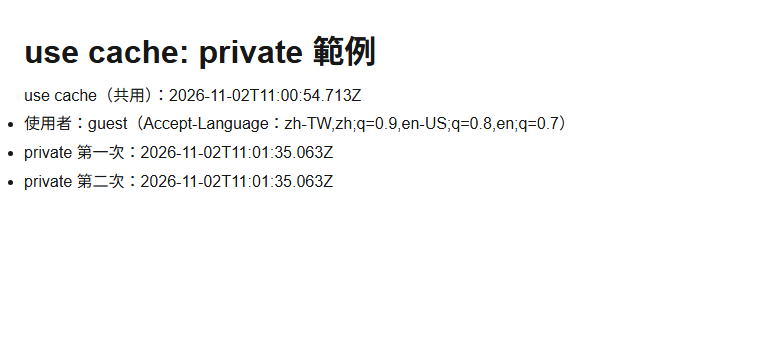
Next.js 16.4.3 next start、Chrome 執行結果
連續送出請求時,use cache 的時間不變,private 的時間每個請求都不同;帶上 Cookie: user=sean 時,函式直接讀到 cookie:
請求 1(無 cookie)
use cache(共用):2026-11-02T11:00:54.713Z
使用者:guest
private 第一次:2026-11-02T11:01:18.367Z
private 第二次:2026-11-02T11:01:18.367Z

請求 2(Cookie: user=sean)
use cache(共用):2026-11-02T11:00:54.713Z
使用者:sean
private 第一次:2026-11-02T11:01:18.518Z
private 第二次:2026-11-02T11:01:18.518Z

請求 3(Cookie: user=sean)
use cache(共用):2026-11-02T11:00:54.713Z
使用者:sean
private 第一次:2026-11-02T11:01:19.707Z
private 第二次:2026-11-02T11:01:19.707Z
同一次建置的輸出中,這個路由標示為 ◐(Partial Prerender),Revalidate/Expire 欄的 1h/1d 來自 getSharedTime 的 cacheLife('hours'):
├ ◐ /tests/nextjs-use-cache-private 1h 1dprivate 快取內可以使用的請求 API
| API | use cache 內 | 'use cache: private' 內 |
|---|---|---|
cookies() | 不可以 | 可以 |
headers() | 不可以 | 可以 |
searchParams | 不可以 | 可以 |
connection() | 不可以 | 不可以 |
connection() 提供的是連線層級的資訊,兩種快取都禁止呼叫。下面的寫法 next build 會通過,但 next start 後開啟頁面時,瀏覽器顯示「This page couldn’t load」,伺服器記錄這個錯誤:
import { connection } from 'next/server'

async function getData() {
  'use cache: private'
  await connection()
  return new Date().toISOString()
}
⨯ Error: Route "/tests/nextjs-use-cache-private/connection-error": `connection()` can't be called inside `"use cache: private"` because private cached functions may run during prefetching, without a navigation request. Call it outside the cached function.
Learn more: https://nextjs.org/docs/app/api-reference/directives/use-cache-private建置時沒出錯,是因為 private 快取函式不納入靜態外殼,建置階段不會執行到這段。錯誤訊息的解法是把 connection() 移到快取函式外面呼叫。
cacheLife 的 stale 怎麼設
private 快取的結果不存進伺服器快取,官方文件針對它說明的是 cacheLife 的 stale,也就是用戶端路由器可以直接沿用結果的時間:
- 至少 30 秒:才能逐連結 prefetch。
- 至少 5 分鐘:內容才會納入路由的 App Shell。
- 路由取最短值:private 快取函式的
stale會計入整個路由的 Client Cache,Next.js 採用路由內所有快取項目中最短的stale。
如果這個函式只是要在同一個請求內去重複呼叫,不希望它把整個路由的 stale 拉低,官方的寫法是設成 Infinity:
async function getSession() {
  'use cache: private'
  cacheLife({ stale: Infinity })
  const id = (await cookies()).get('session-id')?.value
  return id ?? 'guest'
}
沒帶 cookie 時回傳 guest,帶 Cookie: session-id=abc123 時回傳 abc123。
stale: Infinity 不會讓結果跨請求存在伺服器,路由的 stale 仍可能被其他快取或設定縮短。個人化內容需要在固定時間後重新抓取時,改用有限的秒數。
另外,在 Server Action 裡呼叫 updateTag、revalidateTag、revalidatePath 或 refresh 時,整個用戶端快取會立即清除,不受 stale 時間限制。
什麼時候用 use cache: private
官方的建議是優先用 use cache:在快取範圍外讀取 cookie,把需要的值當參數傳進去(寫法見 use cache 那篇 的 cookies() 錯誤修正段落)。'use cache: private' 只在以下情況使用:
- 函式本來就在裡面讀 cookie 或標頭,改成從外面傳參數不切實際。
- 有法規遵循需求,請求專屬的資料不能進入跨請求保存的伺服器快取。
使用前還要知道幾個限制:
- 不能自訂快取處理器:
use cache可以設定 cache handler,'use cache: private'不行。 - 不能和
'use cache: remote'互相巢狀:private 裡不能呼叫 remote 快取函式,remote 裡也不能呼叫 private 快取函式。 - 不在靜態外殼內:用到 private 快取的元件一律在請求時渲染,要搭配
<Suspense>提供 fallback。想在元件需要結果之前就先開始執行,官方文件的 Preloading data 段落有說明。
cacheComponents 開啟後 App Router 預設採用 Partial Prerendering,靜態外殼與串流的概念可以參考 Next.js PPR 教學:結合 SSG 快取速度與 SSR 即時資料的混合渲染解析,設定方式以官方文件的 cacheComponents 為準。






發佈留言