


Next.js 的 next/font 模組會在建置時把字型下載下來、和網站其他靜態檔一起由自己的網域提供,瀏覽器不會再向 Google 發出字型請求,同時自動產生調整過度量的備用字型,降低字型換上去時的版面位移。本文以 Next.js 16(範例在 16.4.3 執行,App Router)說明 next/font/google 與 next/font/local 的寫法、className/style/variable 三種套用方式、各參數預設值,以及 Noto Sans TC 這類中文字型的 subsets 為什麼沒有中文選項。
next/font/google 基本寫法
從 next/font/google import 字型函式,在模組最外層呼叫一次,再把回傳物件的 className 套到元素上。放在 Root Layout 就會套用到整個應用程式;字型的作用範圍只限於使用它的元件:
// app/layout.tsx
import { Inter } from 'next/font/google'

// Inter 是可變字型,不用指定 weight
const inter = Inter({
  subsets: ['latin'],
})

export default function RootLayout({ children }: { children: React.ReactNode }) {
  return (
    <html lang="zh-Hant-TW" className={inter.className}>
      <body>{children}</body>
    </html>
  )
}
next/font 從 Next.js 13.2 起內建(原本是另外安裝的 @next/font),不用裝套件。執行 next build 時,Next.js 會向 Google Fonts 下載 CSS 與字型檔,輸出到 .next/static/media/。
字型名稱有多個單字時,import 名稱用底線連接,例如 Roboto Mono 寫成 Roboto_Mono、Noto Sans TC 寫成 Noto_Sans_TC。
非可變字型一定要指定 weight
官方建議優先用可變字型(variable font);字型不是可變字型時,weight 必填,可以給單一字串或陣列。以 Lato 為例,它在 Next.js 16.4.3 的字型資料中只有 100、300、400、700、900 五種字重,沒有 variable:
import { Lato } from 'next/font/google'

export const lato = Lato({
  weight: ['400', '700'],
  subsets: ['latin'],
})
漏掉 weight 時,next build(Turbopack)會直接失敗,錯誤訊息列出可用字重:
Error: Turbopack build failed with 1 error:
./app/tests/nextjs-font-optimization/e-weight/page.jsx
Error: Module not found: Can't resolve 'next/font/google/target.css'
Missing weight for Lato. Available weights: 100, 300, 400, 700, 900
錯誤第一行寫的是 Module not found,真正原因在下一行的 Missing weight。
next/font/local 載入本機字型
自己的字型檔用 next/font/local 的 localFont 載入,src 必填,路徑相對於呼叫 localFont 的那個檔案。字型檔可以放在專案任何位置,包括 app 資料夾內:
// app/fonts.ts
import localFont from 'next/font/local'

export const myFont = localFont({
  src: './fonts/my-font.woff2',
  variable: '--font-my-font',
})同一個字族有多個字重或樣式的檔案時,src 改用陣列,每個物件寫 path、weight、style:
export const roboto = localFont({
  src: [
    { path: './Roboto-Regular.woff2', weight: '400', style: 'normal' },
    { path: './Roboto-Italic.woff2', weight: '400', style: 'italic' },
    { path: './Roboto-Bold.woff2', weight: '700', style: 'normal' },
  ],
})
next/font/local 的 adjustFontFallback 預設是 'Arial',襯線字型可以改成 'Times New Roman',讓自動產生的備用字型以 Times New Roman 為基礎;設成 false 則不產生。
三種套用方式:className、style、variable
字型函式回傳的物件提供三種用法:
| 屬性 | 內容 | 適合情境 |
|---|---|---|
className | 唯讀的 class 名稱,內含 font-family | 直接在 JSX 元素上套字型 |
style | 唯讀的 style 物件,含 fontFamily(字型名稱+備用字型) | 行內樣式,或要取得字型名稱字串 |
variable | 宣告 CSS 變數的 class 名稱(要先設定 variable 選項) | 在 CSS Module、全域 CSS 或 Tailwind CSS 引用 |
同一個字型要在多處使用時,官方建議集中在一個檔案定義後 import,因為每呼叫一次字型函式,就會在應用程式中多託管一份。下面把四種字型集中在 fonts.ts:
// app/tests/nextjs-font-optimization/fonts.ts
import { Inter, Lato, Noto_Sans_TC } from 'next/font/google'
import localFont from 'next/font/local'

export const inter = Inter({
  subsets: ['latin'],
  variable: '--font-inter',
})

export const lato = Lato({
  weight: ['400', '700'],
  subsets: ['latin'],
})

export const notoSansTC = Noto_Sans_TC({
  subsets: ['latin'],
  variable: '--font-noto-sans-tc',
})

export const georgia = localFont({
  src: './fonts/georgia.ttf',
  variable: '--font-georgia',
  adjustFontFallback: 'Times New Roman',
})
頁面中分別用 className、style 與 CSS 變數套用:
// app/tests/nextjs-font-optimization/page.tsx
import { inter, lato, notoSansTC, georgia } from './fonts'
import styles from './page.module.css'

export default function Page() {
  return (
    <main className={`${inter.variable} ${notoSansTC.variable} ${georgia.variable}`}>
      <p className={inter.className}>Inter(className):The quick brown fox</p>
      <p className={lato.className}>Lato 400(className):The quick brown fox</p>
      <p className={lato.className} style={{ fontWeight: 700 }}>
        Lato 700(className):The quick brown fox
      </p>
      <p style={notoSansTC.style}>Noto Sans TC(style):繁體中文字型測試 ABC</p>
      <p className={styles.local}>Georgia 本機字型(CSS 變數):The quick brown fox</p>
    </main>
  )
}
/* app/tests/nextjs-font-optimization/page.module.css */
.local {
font-family: var(--font-georgia);
font-style: italic;
}variable 回傳的只是一個 class 名稱,要把它加在外層元素上,CSS 變數才會宣告;子元素再用 var(--font-georgia) 引用。style 物件的內容如下,備用字型名稱是原字型名稱加上 Fallback:
{
  "inter.style": { "fontFamily": "'Inter', 'Inter Fallback'", "fontStyle": "normal" },
  "notoSansTC.style": { "fontFamily": "'Noto Sans TC', 'Noto Sans TC Fallback'", "fontStyle": "normal" },
  "georgia.style": { "fontFamily": "'georgia', 'georgia Fallback'" }
}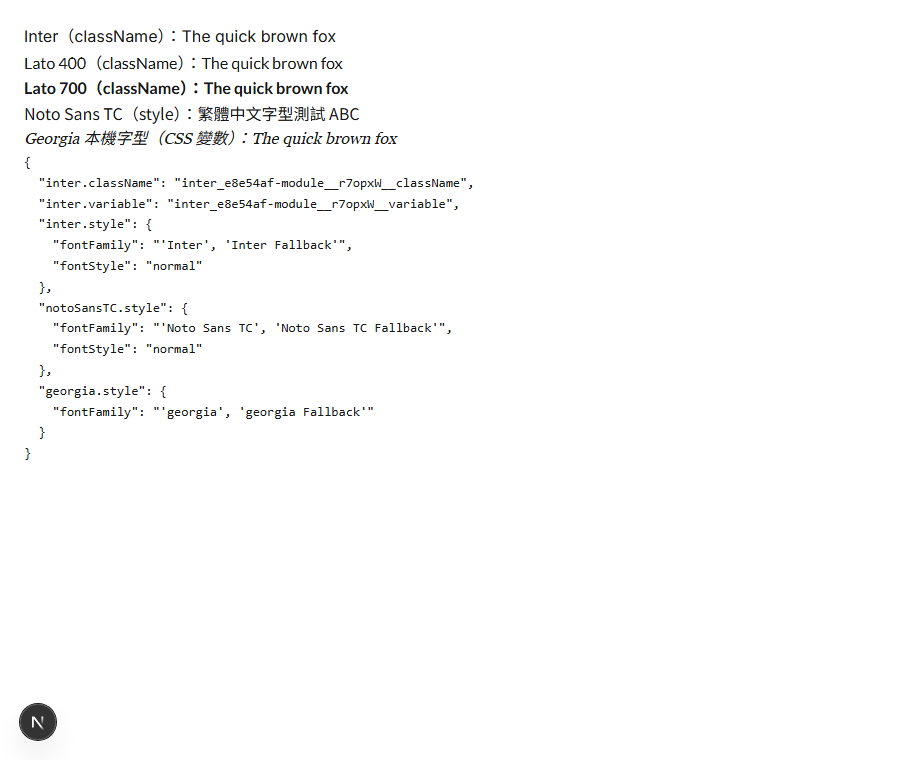
Next.js 16.4.3 next dev、Chrome(Windows 11)顯示結果;開發模式的 class 名稱較長,next build 後會縮短成 r7opxW_className 這類形式。
next/font 參數與預設值
| 參數 | local | 預設值與說明 | |
|---|---|---|---|
src | ✗ | ✓ | 必填。字串或物件陣列,相對於呼叫 localFont 的檔案 |
weight | ✓ | ✓ | 非可變字型必填;陣列寫法只適用 google 的非可變字型 |
style | ✓ | ✓ | 'normal';google 只能用 normal、italic |
subsets | ✓ | ✗ | 要 preload 的子集,例如 ['latin'] |
axes | ✓ | ✗ | 可變字型額外的軸(例如 slnt),預設只含字重軸 |
display | ✓ | ✓ | 'swap';可用 auto、block、swap、fallback、optional |
preload | ✓ | ✓ | true |
fallback | ✓ | ✓ | 無預設值,例如 ['system-ui', 'arial'] |
adjustFontFallback | ✓ | ✓ | google:true;local:'Arial'(可改 'Times New Roman' 或 false) |
variable | ✓ | ✓ | CSS 變數名稱,例如 '--font-inter' |
declarations | ✗ | ✓ | 額外的 @font-face 描述子,例如 [{ prop: 'ascent-override', value: '90%' }] |
display 對應 CSS 的 font-display。預設的 swap 只給字型極短的 block 期與無限的 swap 期:字型還沒下載完就先用備用字型顯示文字,下載完成再換上;optional 同樣只有極短的 block 期,但沒有 swap 期。
自動產生的備用字型:adjustFontFallback 與 size-adjust
adjustFontFallback 開啟時(google 預設 true),Next.js 會額外產生一組 @font-face,以本機的 Arial(或 Times New Roman)為基礎,用 size-adjust 與 ascent-override 等描述子把備用字型的度量調得接近網頁字型。字型下載完換上去時,文字寬高變化較小,減少 Cumulative Layout Shift(CLS)。範例建置後的 CSS 中可以看到:
@font-face{font-family:Inter Fallback;src:local(Arial);ascent-override:90.44%;descent-override:22.52%;line-gap-override:0.0%;size-adjust:107.12%}
@font-face{font-family:Noto Sans TC Fallback;src:local(Arial);ascent-override:110.73%;descent-override:27.49%;line-gap-override:0.0%;size-adjust:104.76%}
@font-face{font-family:georgia Fallback;src:local(Times New Roman);ascent-override:84.39%;descent-override:20.18%;line-gap-override:0.0%;size-adjust:108.66%}
.r7opxW_className 這類 class 的內容就是 font-family:Inter,Inter Fallback,variable 的 class 則宣告 --font-inter:"Inter", "Inter Fallback",兩者都會先列網頁字型、再列調整過的備用字型。
中文字型 Noto Sans TC:subsets 沒有中文選項
在 next/font/google 用 Noto Sans TC 時,subsets 只能填 cyrillic、latin、latin-ext、vietnamese,清單中沒有 chinese-traditional 之類的選項(Next.js 16.4.3 內建的字型資料)。寫成中文子集時,TypeScript 型別檢查就會擋下來:
app/tests/nextjs-font-optimization/e-subset/page.tsx(3,45): error TS2322: Type '"chinese-traditional"' is not assignable to type '"cyrillic" | "latin" | "latin-ext" | "vietnamese"'.中文字形不在這些子集裡,而是被 Google Fonts 切成上百個依 unicode-range 劃分的小檔。範例建置後,Noto Sans TC 一個字型就產生 108 條 @font-face、108 個 woff2 檔,合計約 4 MB。
這些檔案不會全部下載。CSS 的 unicode-range 規則是:頁面沒用到範圍內的字元,該字型檔就不下載;用到至少一個字,就下載那整個檔案。範例頁只有一行中文,瀏覽器實際載入的 Noto Sans TC 檔案是 7 個。
preload 只會針對 subsets 指定的子集。範例寫 subsets: ['latin'],Noto Sans TC 只有 latin 那一個檔案被加上 <link rel="preload" as="font">,中文分片仍是用到才下載。所以中文字型可以這樣設定:
import { Noto_Sans_TC } from 'next/font/google'

// 寫法一:只 preload 拉丁字母子集,中文分片依頁面用字下載
export const notoSansTC = Noto_Sans_TC({
  subsets: ['latin'],
  variable: '--font-noto-sans-tc',
})

// 寫法二:完全不 preload,官方錯誤說明頁對「無法 preload 想要的子集」給的解法
export const notoSansTCNoPreload = Noto_Sans_TC({
  preload: false,
})
Noto Sans TC 在 16.4.3 的字型資料中是可變字型(字重 100~900 並含 variable),所以不用指定 weight。
subsets 沒填或填錯:Turbopack 與 webpack 結果不同
官方文件寫明:preload 為 true 卻沒指定任何 subsets 時會出現警告。在 Next.js 16.4.3 中,兩種建置工具的結果不一樣:
next build --webpack:建置失敗,錯誤訊息如下。
`next/font` error:
Preload is enabled but no subsets were specified for font `Inter`. Please specify subsets or disable preloading if your intended subset can't be preloaded.
Available subsets: `cyrillic`, `cyrillic-ext`, `greek`, `greek-ext`, `latin`, `latin-ext`, `vietnamese`

`next/font` error:
Unknown subset `chinese-traditional` for font `Noto Sans TC`.
Available subsets: `cyrillic`, `latin`, `latin-ext`, `vietnamese`
next build(預設 Turbopack):同樣兩個寫法(以.jsx檔避開 TypeScript 檢查)都建置成功,終端機沒有任何警告,產出的 CSS 裡也沒有被 preload 的字型檔。
也就是說,在預設的 Turbopack 下,subsets 漏寫或拼錯不會被擋,結果只是字型沒有 preload。使用 TypeScript 時,拼錯的子集名稱會在型別檢查階段被擋下;漏寫 subsets 則要自己留意。
字型只在使用它的路由 preload
字型不是全站 preload,而是看呼叫字型函式的檔案用在哪裡:
- 在某個
page使用:只在該頁的路由 preload。 - 在
layout使用:在這個 layout 包住的所有路由 preload。 - 在 Root Layout 使用:所有路由都 preload。
全站共用的內文字型放在 Root Layout;只有特定頁面用到的標題字型,在該頁或該區段的 layout 引用即可,避免每一頁都多 preload 一個字型檔。官方也提醒多個字型要節制使用,每多一個字型,用戶端就多一份要下載的資源。
next/font 處理的是字型的託管、preload 與備用字型;字型 font-display 對 LCP 的影響、整體首屏載入的排查,可以接著看 Core Web Vitals LCP 最大內容繪製:Sub-parts 四階段拆解、fetchpriority 與首屏載入調校。
參考資料與延伸閱讀
- Next.js Docs: Font(next/font API 參考)
- Next.js Docs: Font Optimization
- Next.js Docs: Missing specified subset for a next/font/google font
- vercel/next.js v16.4.3:packages/font/src/google/font-data.json
- MDN: font-display
- MDN: size-adjust
- MDN: unicode-range
- Core Web Vitals LCP 最大內容繪製:Sub-parts 四階段拆解、fetchpriority 與首屏載入調校
- Next.js 13 升級 14 指令與完整步驟速查(npm/yarn/pnpm/bun)
- Next.js use client 指令用法:Client Component 邊界、可序列化 props 與常見錯誤





發佈留言